Flight alerts look simple to travelers.
A flight is delayed.
A gate changes.
A flight departs.
A flight arrives.
The app sends a notification.
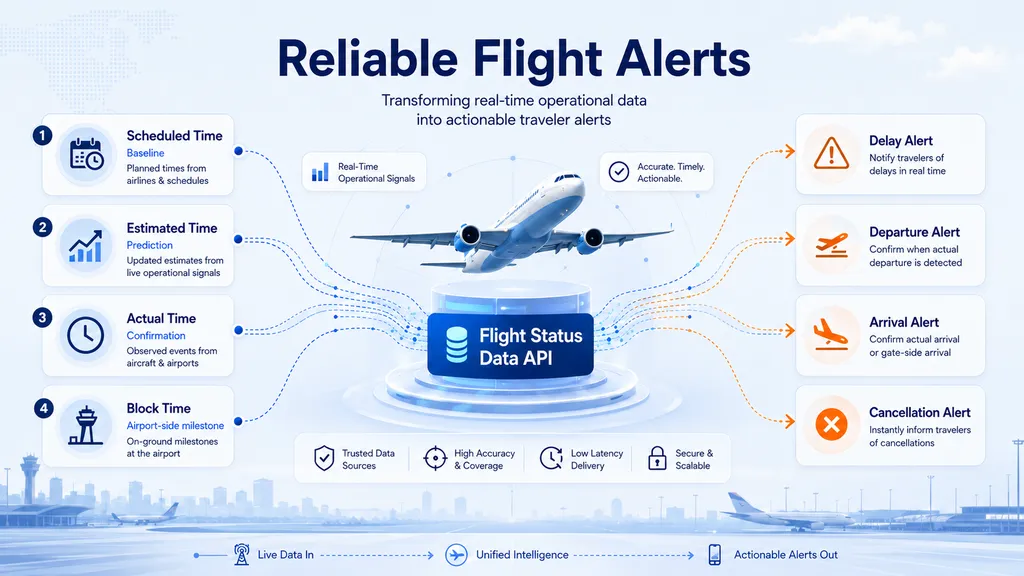
For travel apps, OTAs, TMCs, and travel technology platforms, however, reliable flight alerts are not just basic push messages. They require time hierarchy, status logic, update comparison, and event prioritization.
A good alert system should not send a notification every time a value changes. It should decide whether the change is meaningful, whether the event has already been confirmed, and whether the user needs to take action.
Key Takeaways
| Topic | Practical Meaning |
|---|---|
| ETA is not enough | Estimated time can update repeatedly and should not trigger every alert automatically. |
| Flight status is a classification | Reliable status logic depends on status codes, time fields, cancellation signals, and exception-related data. |
| Snapshot diffing is essential | Apps need to compare the latest flight data with the previous version to avoid duplicate alerts. |
| Actual time confirms events | ATD, ATA, off-block, and on-block times are stronger confirmation signals than estimated time. |
| Low-coverage fields should be optional | Gate, terminal, and baggage information should be used as enhancements where available. |
| Check-in counter is useful for departure preparation | In an internal 10-day sample, check-in counter data showed 94.99% global availability across 1.2M+ scheduled passenger flight records. |
DataWorks by VariFlight provides real-time and historical flight status data for enterprise platforms that need structured aviation data across flight schedules, estimated times, actual movement times, cancellations, airport fields, and operational status updates.
For alert systems, the value is not only showing flight information. The value is helping applications decide what should happen next.
Why Reliable Flight Alerts Need More Than ETA
ETD and ETA are important, but they are not enough to build a reliable flight alert system.
Estimated departure time and estimated arrival time can update repeatedly before and during flight operation. These changes may be caused by:
- weather conditions
- air traffic control
- aircraft rotation
- airport flow control
- gate assignment changes
- upstream flight delays
- operational updates from airlines or airports
A single flight can receive multiple estimated time updates from the day before departure to the day of operation.
That creates a product problem.
| Scenario | Bad Alert Logic | Better Alert Logic |
|---|---|---|
| ETA changes by 5 minutes | Send push notification immediately | Update itinerary silently |
| ETD changes significantly | Only refresh the app page | Send delay alert if threshold is met |
| Flight is cancelled | Keep showing old ETA | Trigger high-priority cancellation alert |
| Actual departure appears | Continue sending delay updates | Confirm departure and stop pre-departure alerts |
The issue is not whether the app has ETA. The issue is how the app interprets ETA changes.
A reliable flight alert system should classify updates into three levels:
- Minor updates
These only refresh the itinerary page. - Meaningful changes
These may deserve a user notification. - Critical events
These should override normal alert logic.
Flight alerts are not just about time changes. They are about operational meaning.
The Time Hierarchy Behind Flight Status API Alerts
A Flight Status API may include several time layers for the same flight. These time fields should not be treated as interchangeable.
| Time Layer | Example Fields | Meaning | Best Use |
|---|---|---|---|
| Scheduled time | STD, STA | Original plan | Build itinerary baseline |
| Estimated time | ETD, ETA | Updated expectation | Detect delay or arrival-time changes |
| Actual time | ATD, ATA | Confirmed movement | Confirm departure or arrival |
| Block time | Off-block, on-block | Airport-side milestone | Refine gate-side departure or arrival status |
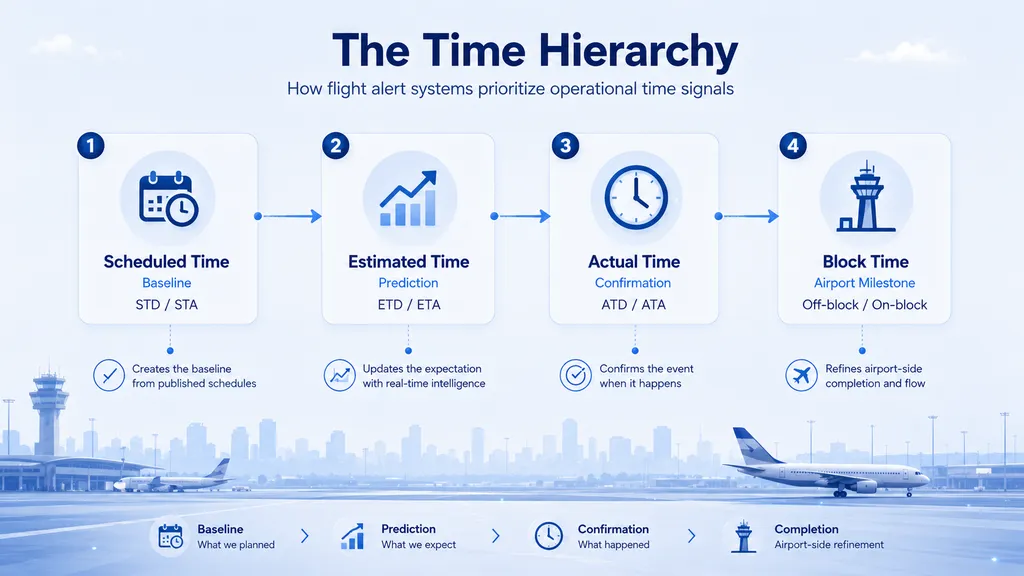
A practical alert system should follow this sequence:
Scheduled time → Estimated time → Actual time → Block time
Or, in operational terms:
- Scheduled time creates the baseline.
- Estimated time updates the expectation.
- Actual time confirms the event.
- Block time refines airport-side completion.
This hierarchy helps apps avoid stale notifications.
For example:
- If actual departure has already been confirmed, the system should not continue sending departure delay alerts based on old ETD.
- If actual arrival or on-block time is available, the system should not rely only on a previous ETA.
- If a flight is cancelled, remaining ETD or ETA values should not be treated as active predictions.
The latest field is not always the most important field. The most important field is the one that best represents the current operational truth.
Flight Status Is a Classification, Not a Single Field
A common mistake is to treat “flight status” as one simple field.
In practice, flight status is an operational classification built from multiple signals, such as:
- status codes
- scheduled time
- estimated time
- actual departure and arrival time
- cancellation signals
- off-block and on-block time
- route and airport-side exception data
A travel app should not rely on one static status label. It should build a state model.
Basic Flight Alert State Model
| State | Meaning | Typical Alert Action |
|---|---|---|
| Scheduled | Flight is planned but not yet active | Show in itinerary |
| Delayed | Estimated time has moved beyond the planned baseline | Send delay alert if threshold is met |
| Departed | Actual departure or departure status is confirmed | Send departure confirmation |
| Arrived | Actual arrival or arrival status is confirmed | Send arrival confirmation |
| Cancelled | Flight is no longer operating | Send high-priority cancellation alert |
| Returned | Flight returned after departure | Trigger exception handling |
| Diverted | Flight landed at another airport | Trigger exception handling |
In DataWorks internal validation using more than 1.15 million scheduled passenger flight records from June 20 to June 29, 2026, each record could be mapped to an operational status category through status codes and supporting signals.
This does not mean that “flight status” should be treated as one universal field. It means that applications can build a reliable state model by combining status logic with time and event signals.
The stronger question is not:
“What is the status label?”
The stronger question is:
“Which operational state is the flight in now, and has that state changed enough to notify the user?”
Why Apps Need Snapshot Diffing
Many flight status APIs return the latest operational snapshot. The latest snapshot is useful, but it does not automatically tell the application what changed since the previous update.
For flight alert systems, that comparison is essential.
What Snapshot Diffing Does
| Step | What Happens |
|---|---|
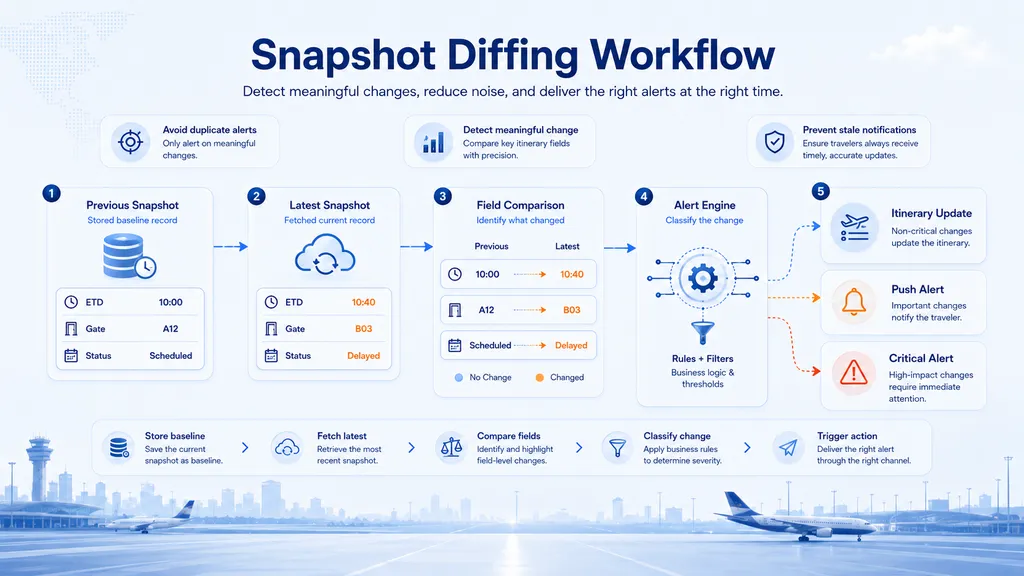
| 1. Store previous snapshot | The app keeps the last known flight data state. |
| 2. Retrieve latest snapshot | The API returns the most recent flight data. |
| 3. Compare key fields | The app checks ETD, ETA, ATD, ATA, status logic, cancellation, gate, terminal, and airport-side fields. |
| 4. Classify the change | The alert engine decides whether the update is minor, meaningful, or critical. |
| 5. Trigger action | The app updates the interface, sends a notification, or escalates the event. |
| 6. Save new baseline | The latest snapshot becomes the comparison point for the next update. |
Without snapshot diffing, apps may:
- send duplicate notifications
- miss important status changes
- continue showing stale flight information
- treat small ETA changes as urgent alerts
- fail to prioritize cancellation or abnormal operation events
Reliable alerts require both data and memory.
The API provides the latest data.
The application provides the comparison logic.
How to Avoid Duplicate Flight Alerts
Duplicate alerts usually happen when apps treat every field update as a notification event.
This is especially common with ETD and ETA. Estimated times may update many times, but not every update deserves a push notification.
A better flight alert system uses three controls.
1. Field-Level Diffing
Store the previous value and compare it with the latest value.
Example:
| Previous ETD | Latest ETD | Suggested Action |
|---|---|---|
| 10:00 | 10:05 | Update itinerary only |
| 10:00 | 10:40 | Send delay alert |
| 10:40 | 10:45 | Avoid repeated alert unless threshold is crossed again |
2. Threshold-Based Alerts
A small time movement may not require a notification. A larger delay may require one.
Each platform can define its own threshold based on:
- user expectations
- business rules
- trip type
- route type
- notification channel
- severity of disruption
3. State Priority
Critical events should override normal time-change logic.
Recommended priority:
- Cancelled
- Returned / diverted
- Actual departure
- Actual arrival / on-block
- Significant ETD / ETA drift
- Gate or terminal change where available
- Minor estimated time update
This prevents notification fatigue and improves user trust.
A simple rule works well:
Update the interface often, but notify the user only when the change affects action.
How to Prevent Stale Flight Status
Stale flight status happens when an application shows or sends information that still exists in the data but no longer represents the correct operational state.
Common Stale Status Problems
| Problem | Why It Happens | Better Logic |
|---|---|---|
| Cancelled flight still shows ETA | Previous ETA remains in the latest snapshot | Prioritize cancellation status and ignore remaining ETA |
| Departed flight still shows delay alert | ETD remains visible after actual departure | Use actual departure as confirmation |
| Arrived flight still shows ETA | ETA remains after actual arrival | Use ATA or on-block time |
| Abnormal operation follows normal route logic | Diversion or return is not handled separately | Use exception logic |
To avoid stale status, alert systems should apply status-first logic for critical events.
Use these rules:
- If the flight is cancelled, ignore remaining ETD or ETA for alert decisions.
- If actual departure exists, treat departure as confirmed.
- If actual arrival or on-block time exists, treat arrival as confirmed or airport-complete.
- If abnormal operation is detected, use exception logic rather than normal route timing alone.
The alert engine should always ask:
“Which field best represents the operational truth now?”
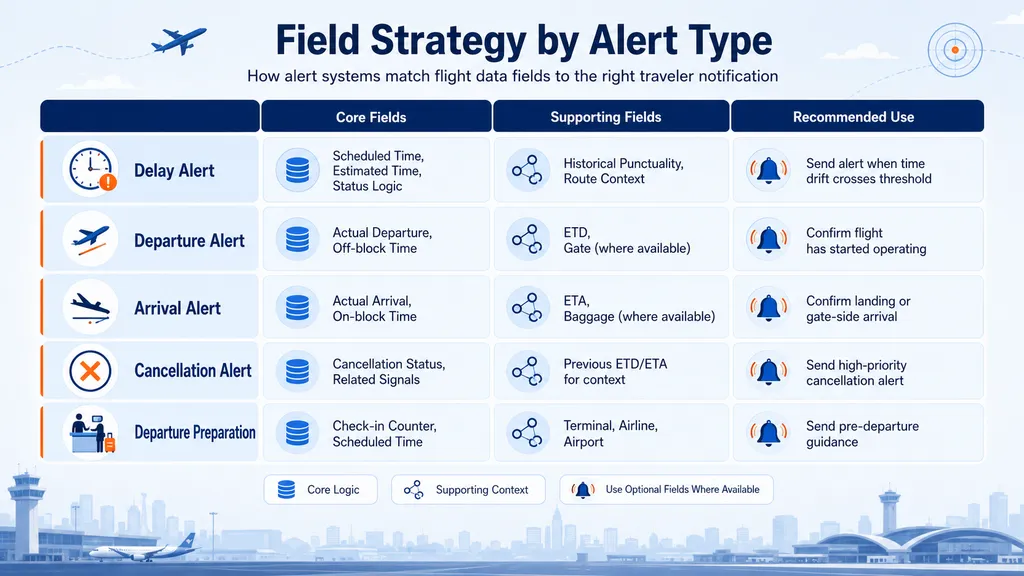
Which Data Fields Should Drive Different Alert Types?
Not all fields should be used in the same way. Some fields should drive the core alert engine. Others should only enhance the user experience when available.
Field Strategy by Alert Type
| Alert Type | Core Fields | Supporting Fields | Recommended Use |
|---|---|---|---|
| Delay alert | Scheduled time, estimated time, status logic | Historical punctuality, route context | Send alert when time drift crosses threshold |
| Departure alert | Actual departure, off-block time | ETD, terminal, gate where available | Confirm that the flight has started operating |
| Arrival alert | Actual arrival, on-block time | ETA, baggage carousel where available | Confirm landing or gate-side arrival |
| Cancellation alert | Cancellation status and related signals | Previous ETD / ETA for context only | Send high-priority alert |
| Departure preparation | Check-in counter, scheduled time | Terminal, airline, airport | Send pre-departure guidance |
| Gate change alert | Gate field where available | Terminal, boarding-related fields | Use as enhancement where reliable |
High-Confidence Field Example
In an internal 10-day validation sample of more than 1.2 million scheduled passenger flight records, check-in counter data showed 94.99% global availability.
This makes check-in counter information a strong field for departure preparation scenarios, especially when combined with scheduled time and terminal context.
Example use case:
“Your flight departs at 10:00. Check-in counter information is available. Please prepare for airport check-in.”
Airport-side fields such as terminal, gate, and baggage carousel can improve traveler experience, but their availability may vary by region and airport. These fields should be treated as contextual or optional enhancement fields rather than universal alert triggers.
A Practical Flight Alert Workflow
A travel app can use Flight Status API data in the following workflow.
Step-by-Step Workflow
- User adds a flight
The user adds a flight to a watchlist, imports a booking, or creates an itinerary. - Application matches the flight
The app uses flight number, airline, route, date, and airport information to identify the correct flight. - System retrieves the latest snapshot
The Flight Status API returns the latest operational data. - Application compares snapshots
The app compares the latest snapshot with the previous stored snapshot. - Alert engine classifies the update
The system decides whether the update is minor, meaningful, or critical. - Notification logic triggers action
The app updates the itinerary page, sends a notification, or escalates the event. - Latest snapshot becomes the new baseline
The system stores the new data for the next comparison.
Example Alert Rules
| Event | Trigger Logic | Suggested User Action |
|---|---|---|
| Minor ETD change | ETD changes slightly | Update itinerary only |
| Major delay | ETD or ETA crosses delay threshold | Send delay alert |
| Departure confirmed | Actual departure or off-block time appears | Send departure confirmation |
| Arrival confirmed | Actual arrival or on-block time appears | Send arrival confirmation |
| Cancellation detected | Cancellation status appears | Send high-priority alert |
| Gate change | Gate changes where available | Notify user if relevant |
| Abnormal operation | Return or diversion logic is detected | Trigger exception alert |
This workflow helps applications reduce duplicate alerts, avoid stale notifications, and separate routine updates from critical events.
Why This Matters for OTAs, TMCs, and Travel Technology Platform
Reliable flight alerts create different value for different travel platforms.
| Platform Type | Business Value |
|---|---|
| Consumer flight apps | Improve user trust and app engagement during the journey |
| OTAs | Improve post-booking experience and reduce repetitive flight status checks |
| TMCs | Monitor affected corporate travelers and prioritize disrupted trips |
| Travel technology platforms | Power itinerary updates, traveler messaging, workflow automation, and disruption monitoring |
| Customer service teams | Separate routine updates from cases that need human support |
The business value does not come from displaying one more field.
It comes from turning flight operation data into workflow decisions.
Why DataWorks by VariFlight
DataWorks by VariFlight provides structured aviation data for enterprise platforms that need real-time flight status, historical flight data, airport operation fields, and flight alert workflows.
The Flight Status Data API supports use cases across:
- OTAs
- TMCs
- travel apps
- insurers
- enterprise operations
- airport-related platforms
- customer service systems
Instead of building fragmented pipelines across airlines, airports, aircraft tracking sources, and operational feeds, platforms can integrate structured flight status data through API access and build business rules on top of it.
For flight alert systems, this means applications can monitor:
- scheduled time
- estimated time
- actual time
- cancellation signals
- operational status categories
- airport-side information
- departure and arrival milestones
With the right alert logic, flight status data becomes more than a display feature. It becomes the foundation for delay, departure, arrival, cancellation, and journey update workflows.
Conclusion
Reliable flight alerts are not built by sending a notification every time ETA changes.
They require:
- time hierarchy
- status classification
- field-level snapshot diffing
- event priority
- stale status prevention
- realistic use of airport-side fields
Scheduled time defines the baseline. Estimated time updates the expectation. Actual time confirms movement. Block time refines airport-side milestones. Cancellation and exception signals override normal timing logic. Airport-side fields can improve the user experience when available.
For travel apps, OTAs, TMCs, and travel technology platforms, a Flight Status API is not only a source of flight information. It is the data foundation for building reliable delay, departure, arrival, cancellation, and journey update workflows.
Start your 14-day free trial with DataWorks by VariFlight to test real-time flight status data and build more reliable flight alert experiences.

FAQ
What is a Flight Status API?
A Flight Status API provides structured data about flight schedules, estimated times, actual departure and arrival times, cancellations, operational status, airport fields, and related flight events.
How can apps avoid duplicate flight alerts?
Apps can avoid duplicate flight alerts by storing the previous flight snapshot, comparing it with the latest API response, applying time-change thresholds, and prioritizing critical events such as cancellation, departure, and arrival.
Why should flight alerts not rely only on ETA?
ETA is a prediction field and may update repeatedly. Reliable alert systems should use ETA for expectation updates, but rely on actual time, block time, cancellation signals, and status classification to confirm operational events.
What is snapshot diffing in a flight alert system?
Snapshot diffing means comparing the latest flight data response with the previous stored response. This helps applications detect meaningful changes, avoid repeated alerts, and prevent stale notifications.
Which fields are most useful for flight alerts?
Core fields include scheduled time, estimated time, actual departure and arrival time, block time, cancellation signals, and operational status classification. Airport-side fields such as check-in counter, terminal, gate, and baggage carousel can support additional traveler guidance when available.
How does a Flight Status API support departure and arrival alerts?
For departure alerts, the system can use estimated departure time, actual departure time, and off-block time. For arrival alerts, the system can use ETA, actual arrival time, and on-block time to determine whether the flight is expected, landed, or gate-arrived.
Why is check-in counter data useful for departure preparation?
Check-in counter data helps apps provide pre-departure airport guidance. In an internal 10-day validation sample of more than 1.2 million scheduled passenger flight records, check-in counter data showed 94.99% global availability, making it useful for departure preparation workflows.
Should apps use gate and baggage carousel data for alerts?
Yes, but carefully. Gate, terminal, and baggage carousel data can improve traveler experience, but availability may vary by region and airport. These fields are best used as optional enhancements where available, not as universal alert triggers.